Prototyping complex interactions
Prototyping complex interactions
Tools:

ChatGPT
ChatGPT
ChatGPT

Figma Make
Figma Make
Figma Make

Vercel 0
Vercel 0
Vercel 0

Lovable
Lovable
Lovable
With structured prompts, I can quickly generate interaction-ready screens for usability testing or engineering handoff. These prototypes behave closer to the real product, which improves cross-team communication and gives users a more realistic experience during testing. As a result, usability feedback tends to be more specific and actionable.

View the prompt instructions used in the workflow below if you'd like to try or adapt the approach.
View the prompt instructions used in the workflow below if you'd like to try or adapt the approach.
View the prompt instructions used in the workflow below if you'd like to try or adapt the approach.
View the prompt instructions used in the workflow below if you'd like to try or adapt the approach.
1
Inventory the interface
I start by asking AI to scan the references, list the screens using their exact frame names, and propose a minimal click-through flow. If anything is unclear, have it ask clarification questions.
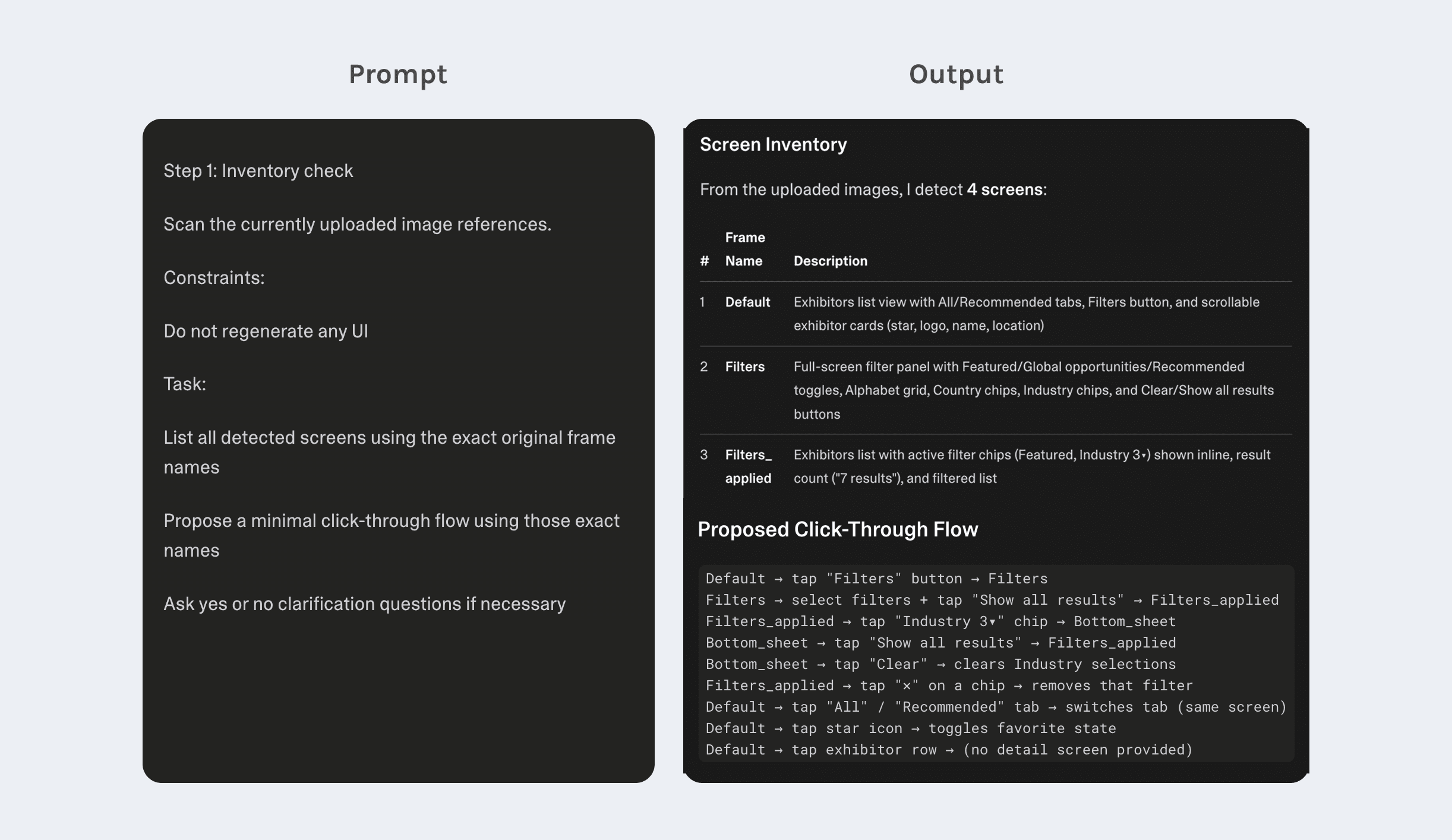
Human review
Confirm the screen list matches the original frames and the flow reflects the intended paths. Fix missing or incorrect connections before continuing.
1
Inventory the interface
I start by asking AI to scan the references, list the screens using their exact frame names, and propose a minimal click-through flow. If anything is unclear, have it ask clarification questions.
Human review
Confirm the screen list matches the original frames and the flow reflects the intended paths. Fix missing or incorrect connections before continuing.
1
Inventory the interface
I start by asking AI to scan the references, list the screens using their exact frame names, and propose a minimal click-through flow. If anything is unclear, have it ask clarification questions.
Human review
Confirm the screen list matches the original frames and the flow reflects the intended paths. Fix missing or incorrect connections before continuing.
1
Inventory the interface
I start by asking AI to scan the references, list the screens using their exact frame names, and propose a minimal click-through flow. If anything is unclear, have it ask clarification questions.
Human review
Confirm the screen list matches the original frames and the flow reflects the intended paths. Fix missing or incorrect connections before continuing.
2
Recreate the screens
Using the approved screen list and flow, I ask AI to recreate the screens from the reference and enable the click-through interactions. When behavior is not visible in the UI, I define it in the prompt.
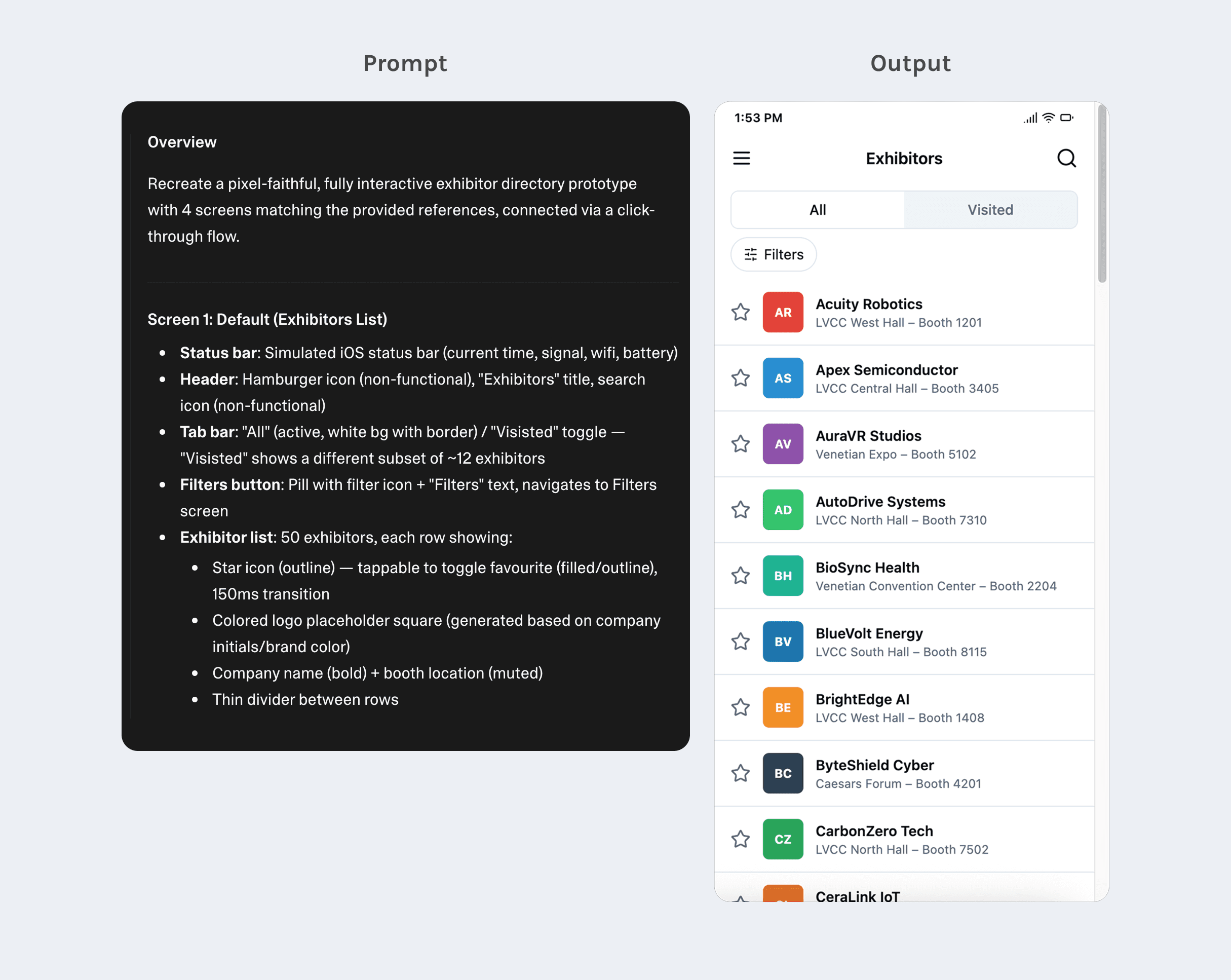
Human review
Check whether the generated screen matches the proposed interaction flow. If not, refine the prompt before moving forward.
2
Recreate the screens
Using the approved screen list and flow, I ask AI to recreate the screens from the reference and enable the click-through interactions. When behavior is not visible in the UI, I define it in the prompt.
Human review
Check whether the generated screen matches the proposed interaction flow. If not, refine the prompt before moving forward.
2
Recreate the screens
Using the approved screen list and flow, I ask AI to recreate the screens from the reference and enable the click-through interactions. When behavior is not visible in the UI, I define it in the prompt.
Human review
Check whether the generated screen matches the proposed interaction flow. If not, refine the prompt before moving forward.
2
Recreate the screens
Using the approved screen list and flow, I ask AI to recreate the screens from the reference and enable the click-through interactions. When behavior is not visible in the UI, I define it in the prompt.
Human review
Check whether the generated screen matches the proposed interaction flow. If not, refine the prompt before moving forward.
3
Align visual fidelity
If the generated screen differs from the reference, I summarize the visual discrepancies using ChatGPT and ask the prototype tool to fix only those specific properties.
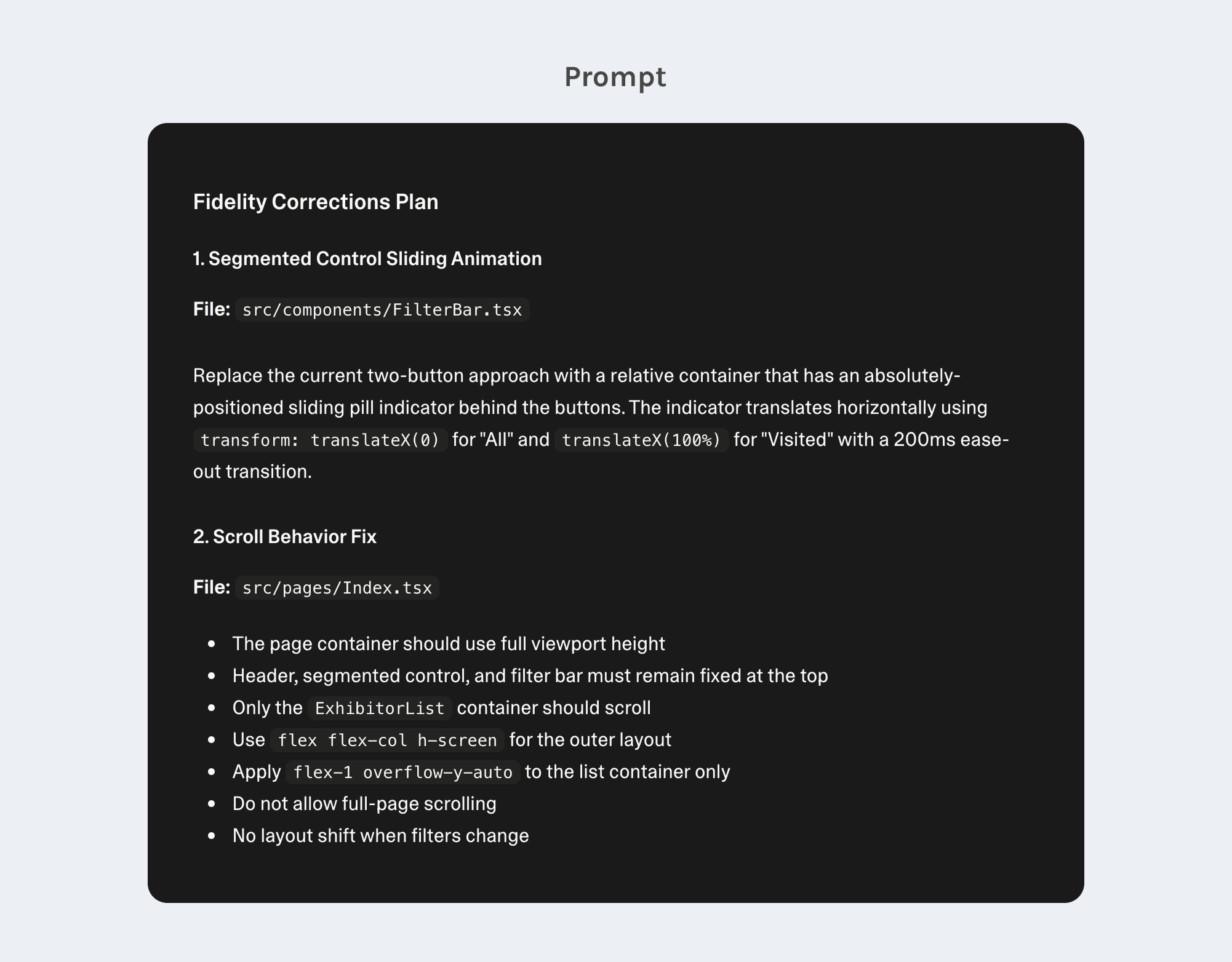
Human review
Compare the updated screen with the reference and confirm the discrepancies are resolved without changing unrelated elements.
3
Align visual fidelity
If the generated screen differs from the reference, I summarize the visual discrepancies using ChatGPT and ask the prototype tool to fix only those specific properties.
Human review
Compare the updated screen with the reference and confirm the discrepancies are resolved without changing unrelated elements.
3
Align visual fidelity
If the generated screen differs from the reference, I summarize the visual discrepancies using ChatGPT and ask the prototype tool to fix only those specific properties.
Human review
Compare the updated screen with the reference and confirm the discrepancies are resolved without changing unrelated elements.
3
Align visual fidelity
If the generated screen differs from the reference, I summarize the visual discrepancies using ChatGPT and ask the prototype tool to fix only those specific properties.
Human review
Compare the updated screen with the reference and confirm the discrepancies are resolved without changing unrelated elements.
4
Build in-page interactions
Once the screens are stable, I add in-page interactions such as toggles, expand or collapse sections, anchor navigation, or reset actions. These behaviors help simulate realistic product use within a single screen.
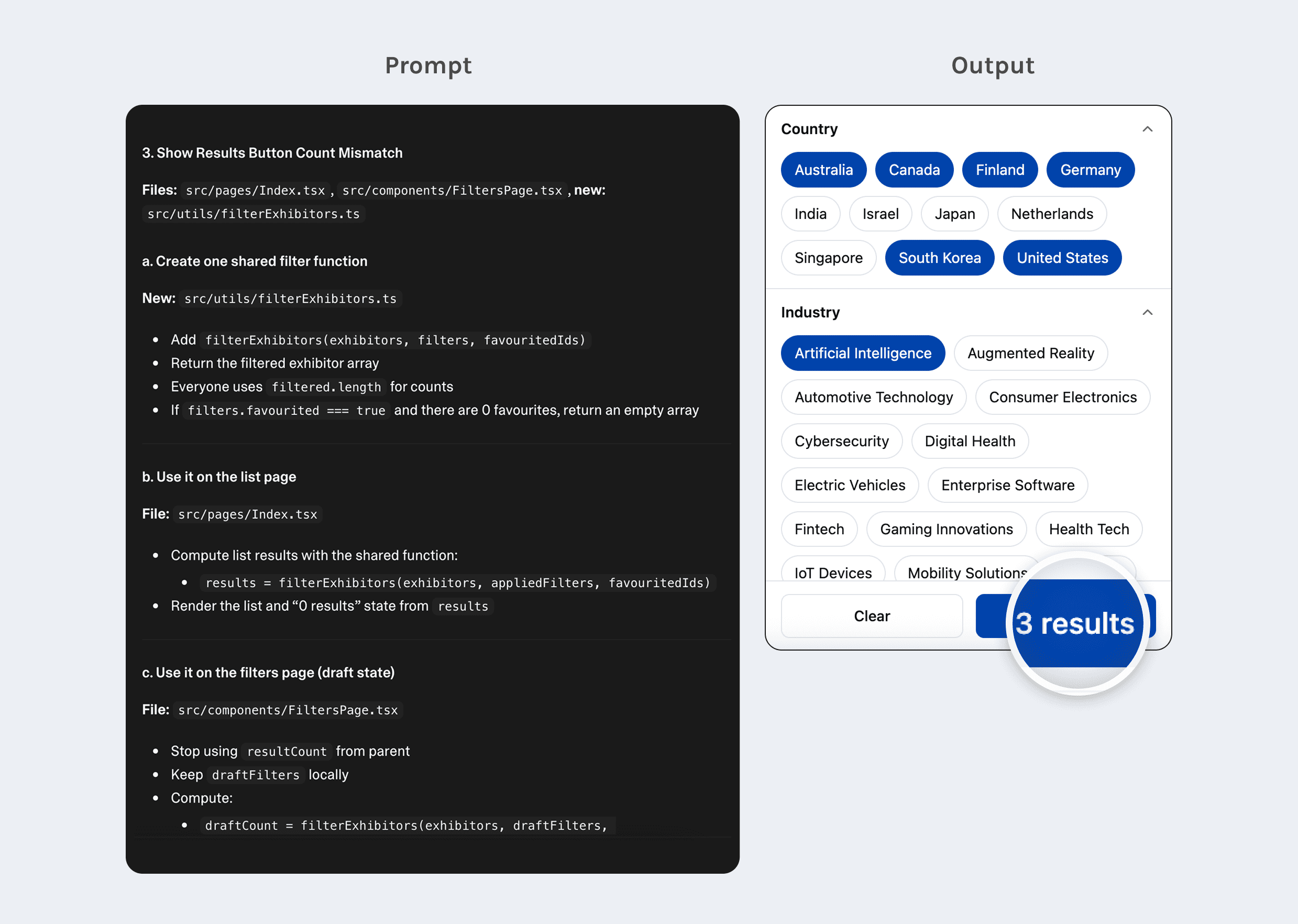
Human review
Test the interactions to confirm the behavior matches the intended logic and that state changes are clear and consistent.
4
Build in-page interactions
Once the screens are stable, I add in-page interactions such as toggles, expand or collapse sections, anchor navigation, or reset actions. These behaviors help simulate realistic product use within a single screen.
Human review
Test the interactions to confirm the behavior matches the intended logic and that state changes are clear and consistent.
4
Build in-page interactions
Once the screens are stable, I add in-page interactions such as toggles, expand or collapse sections, anchor navigation, or reset actions. These behaviors help simulate realistic product use within a single screen.
Human review
Test the interactions to confirm the behavior matches the intended logic and that state changes are clear and consistent.
4
Build in-page interactions
Once the screens are stable, I add in-page interactions such as toggles, expand or collapse sections, anchor navigation, or reset actions. These behaviors help simulate realistic product use within a single screen.
Human review
Test the interactions to confirm the behavior matches the intended logic and that state changes are clear and consistent.
5
Add micro-interactions
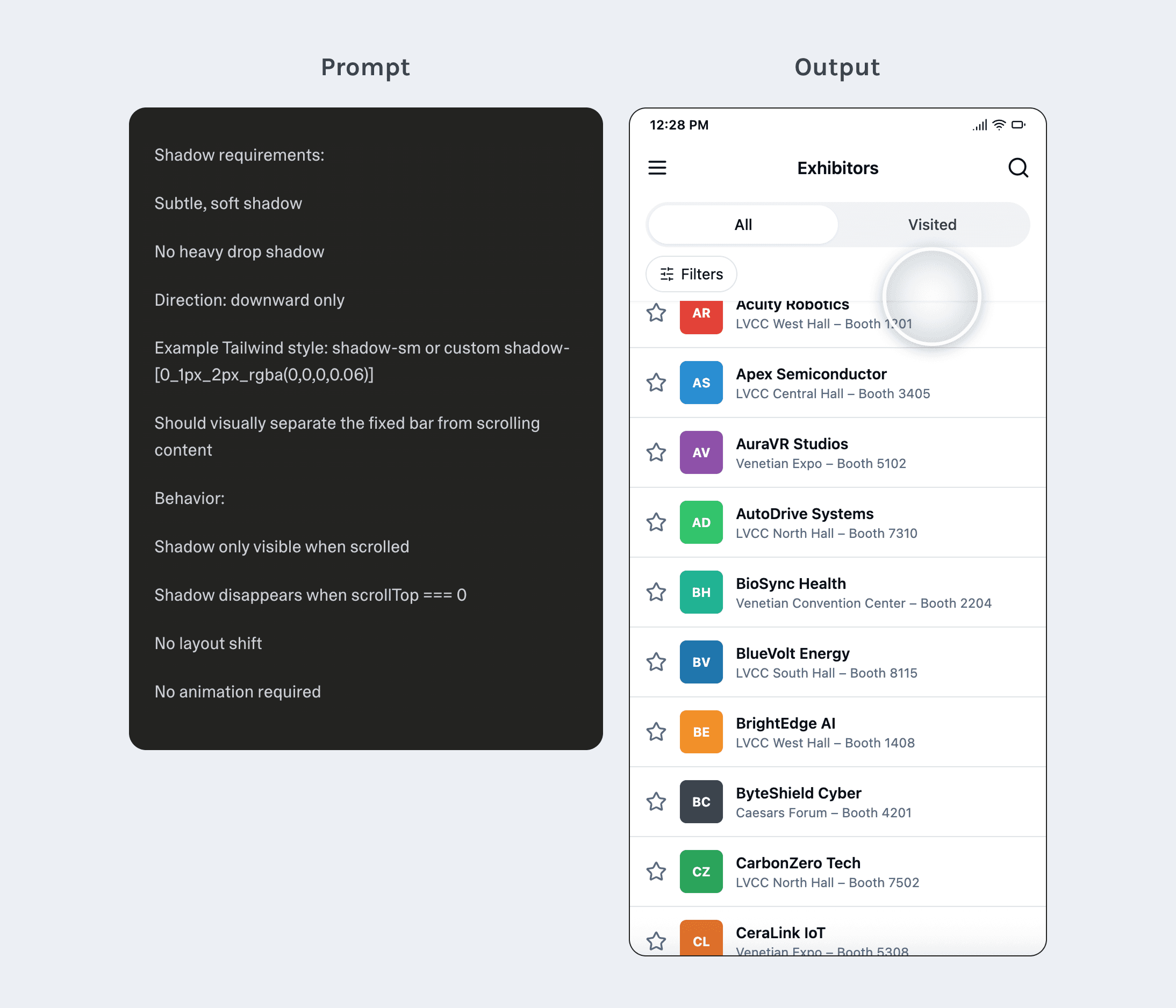
I add subtle micro-interactions such as hover, pressed, loading, success, and error states. Transitions stay minimal so the prototype communicates system feedback without distracting from the flow.
Human review
Check if micro-interactions feel consistent and support the interaction without adding unnecessary motion.
5
Add micro-interactions
I add subtle micro-interactions such as hover, pressed, loading, success, and error states. Transitions stay minimal so the prototype communicates system feedback without distracting from the flow.
Human review
Check if micro-interactions feel consistent and support the interaction without adding unnecessary motion.
5
Add micro-interactions
I add subtle micro-interactions such as hover, pressed, loading, success, and error states. Transitions stay minimal so the prototype communicates system feedback without distracting from the flow.
Human review
Check if micro-interactions feel consistent and support the interaction without adding unnecessary motion.
5
Add micro-interactions
I add subtle micro-interactions such as hover, pressed, loading, success, and error states. Transitions stay minimal so the prototype communicates system feedback without distracting from the flow.
Human review
Check if micro-interactions feel consistent and support the interaction without adding unnecessary motion.