Design impact beyond UI

Design impact beyond UI

🧩 Token sets

🧩 Token sets

🧩 Token sets

🧩 Token sets

💠 Components guideline

💠 Components guideline

💠 Components guideline

💠 Components guideline

📑 Design document

📑 Design document

📑 Design document

📑 Design document

🧑‍💻 User research/testing initiatives

🧑‍💻 User research/testing initiatives

🧑‍💻 User research/testing initiatives

🧑‍💻 User research/testing initiatives

♿ Accessibility training

♿ Accessibility training

♿ Accessibility training

♿ Accessibility training

⚡ TL;DR

Design is often seen as “making things pretty”. I challenge that view by taking initiatives that shape systems, empower teams, and deliver tangible impact, ultimately influencing strategy and elevating the role of design.

📊 Impact

Reduced button detachment from 17% to 2% in one month and cut its component variants by 60%.

Reduced button detachment from 17% to 2% in one month and cut its component variants by 60%.
Reduced button detachment from 17% to 2% in one month and cut its component variants by 60%.

Reduced button detachment from 17% to 2% in one month and cut its component variants by 60%.

Componentized 98% of reusable UI elements across owned mobile screens.

Componentized 98% of reusable UI elements across owned mobile screens.
Componentized 98% of reusable UI elements across owned mobile screens.

Componentized 98% of reusable UI elements across owned mobile screens.

Reduced UI update effort by about 30 minutes per 20 screens by applying single-property changes through components instead of manual updates.

Reduced UI update effort by about 30 minutes per 20 screens by applying single-property changes through components instead of manual updates.

Reduced UI update effort by about 30 minutes per 20 screens by applying single-property changes through components instead of manual updates.

Reduced UI update effort by about 30 minutes per 20 screens by applying single-property changes through components instead of manual updates.

Data source: Figma design system analytics, manual screen audit
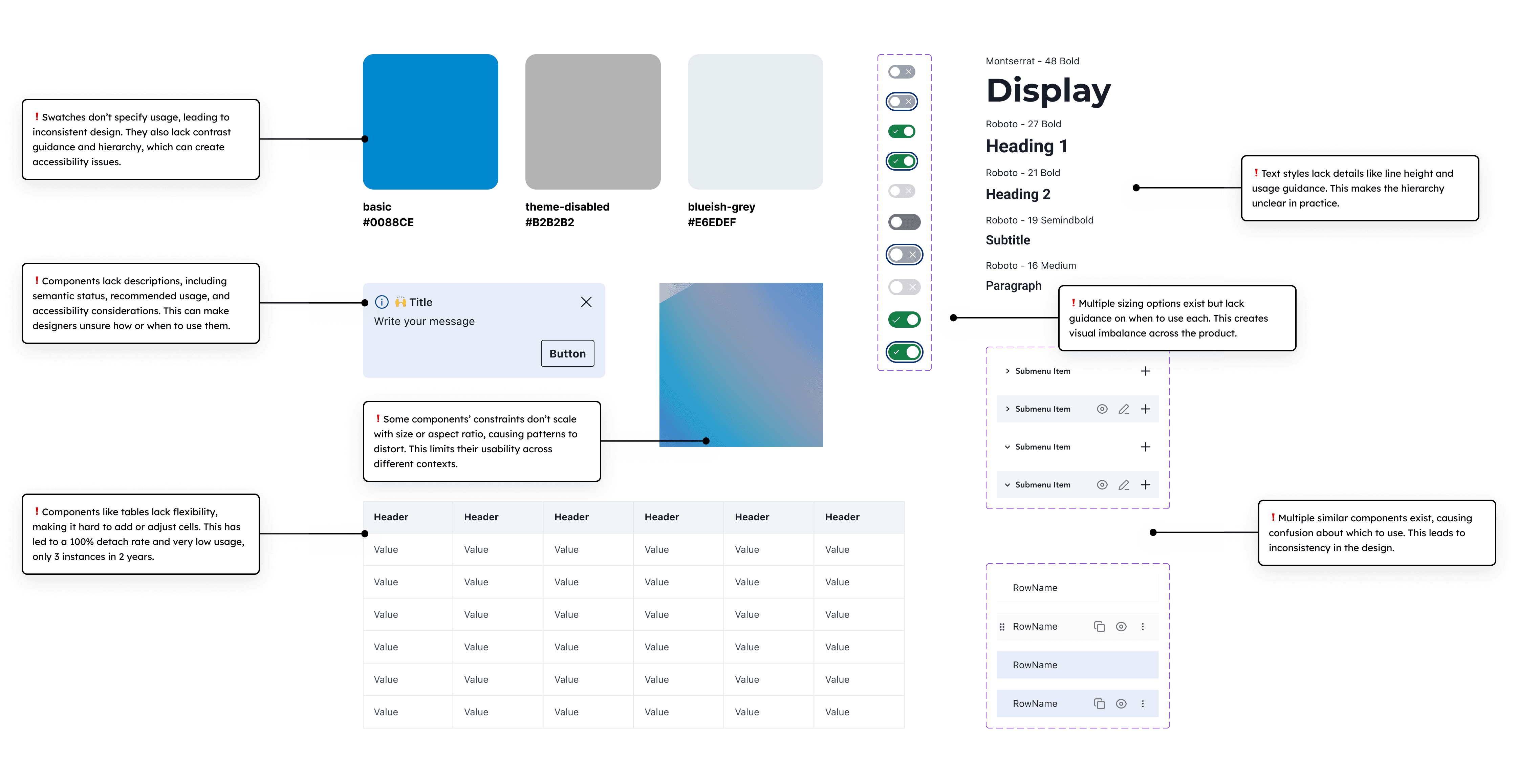
🧬 Design system evolution

Before

Before

Before

Before

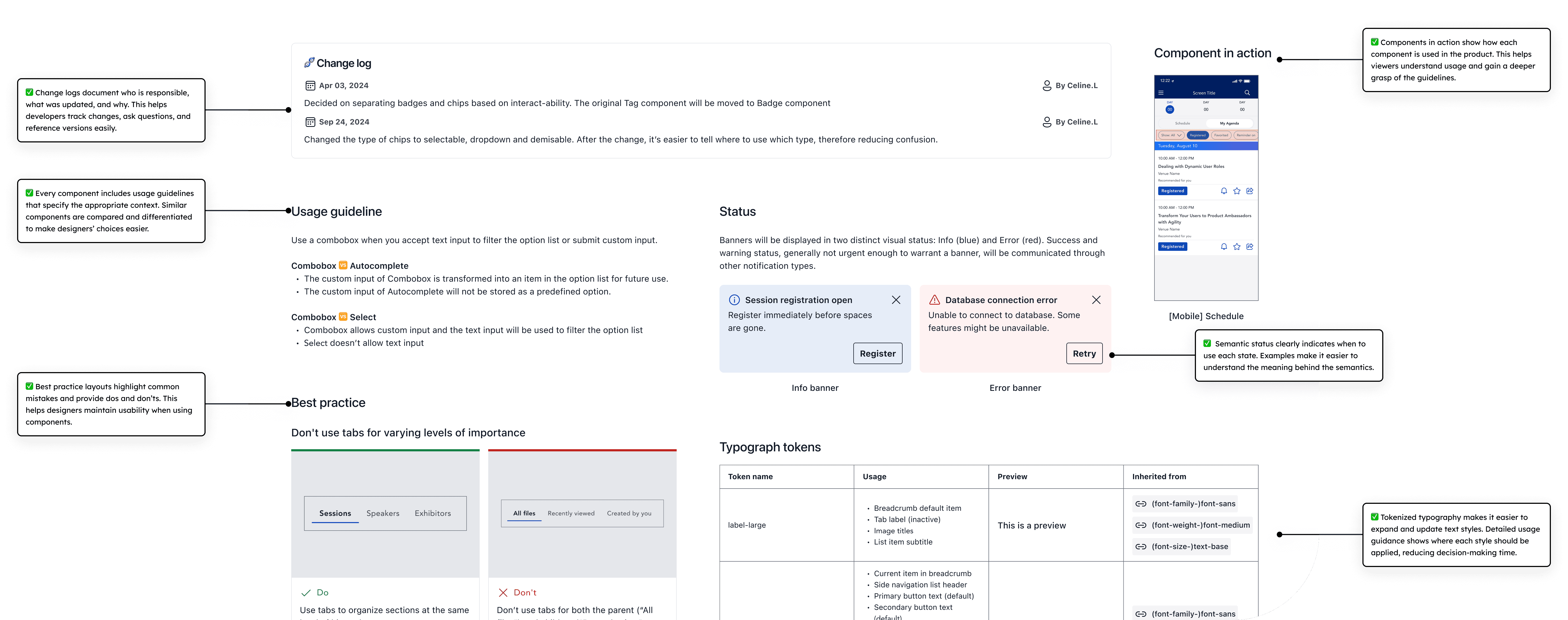
The "Before" visual highlights problems in the legacy design library, such as inconsistent styles, accessibility issues, and unclear component usage.
  • Missing component descriptions ➜ designers were unsure how or when to use them.

  • Inflexible components like tables ➜ low adoption, high detachment rate, and limited usage.

  • Text styles lack line height and usage guidance ➜ unclear hierarchy in practice.e

  • Multiple sizing options without guidance ➜ visual imbalance across the product

  • Multiple similar components ➜ confusion and inconsistent design

After

After

After

After

The "After" visual documents the improved design system with a change log, usage guidelines, and best practices.
  • Clear change logs document ownership, updates, and rationale ➜ developers can track changes, ask questions, and reference versions

  • Component usage guidelines define when and how to use each component, with comparisons between similar components ➜ designers make faster, more confident choices

  • Best practice highlights common mistakes with clear dos and don’ts ➜ designers maintain usability and consistency in implementation

  • Components in action show how each component is used in the product ➜ bridges the gap between the design system and real product usage, increasing adoption

  • Semantic status clearly defines meaning and appropriate usage ➜ ensures consistent interpretation and helps users understand the nature of each message

  • Detailed typography guidance defines where each style applies ➜ creates consistent hierarchy and supports accessible text usage

24

component guidelines drafted

24

component guidelines drafted

24

component guidelines drafted

24

component guidelines drafted

54%

outdated components were cleared

54%

outdated components were cleared

54%

outdated components were cleared

54%

outdated components were cleared

8

token types created, replacing 83% of styles

8

token types created, replacing 83% of styles

8

token types created, replacing 83% of styles

8

token types created, replacing 83% of styles

3

presentations delivered on adoption

3

presentations delivered on adoption

3

presentations delivered on adoption

3

presentations delivered on adoption

Thoughtful design begins with meaningful conversations.

Whether you're building a UX team or just want to exchange ideas, I’d love to connect.

Crafted with 🦊 curiosity, caffeine, and debug tears.

© 2025 Celine.Li.

Thoughtful design begins with meaningful conversations.

Whether you're building a UX team or just want to exchange ideas, I’d love to connect.

Crafted with 🦊 curiosity, caffeine, and debug tears.

© 2025 Celine.Li.

Thoughtful design begins with meaningful conversations.

Whether you're building a UX team or just want to exchange ideas, I’d love to connect.

Crafted with 🦊 curiosity, caffeine, and debug tears.

© 2025 Celine.Li.

Thoughtful design begins with meaningful conversations.

Whether you're building a UX team or just want to exchange ideas, I’d love to connect.

Crafted with 🦊 curiosity, caffeine, and debug tears.

© 2025 Celine.Li.